 cf8b7533fe
Webapp Test / Run webapp test suite (push) Failing after 0s
Details
Publish / Gate: k8s deploy e2e (push) Failing after 3s
Details
Publish / Build and publish (push) Has been skipped
Details
Deploy Test / Run deploy test suite (push) Failing after 0s
Details
K8s Deploy Test / Run deploy test suite on kind/k8s (push) Failing after 0s
Details
Lint Checks / Run linter (push) Failing after 0s
Details
Smoke Test / Run basic test suite (push) Failing after 0s
Details
- Maintenance-page swap during `restart` was broken: Ingress got patched to point at `{app_name}-{pod_name}-service` for the maintenance pod, but that Service was never created. Caddy had no valid backend, users saw "site cannot be reached" instead of the maintenance page
- Root cause: `get_services()` only builds per-pod Services for pods referenced by `http-proxy` routes; the maintenance pod has no http-proxy route by design
- Fix: `get_services()` now also includes the container named by `maintenance-service:` in the container-ports map, so its per-pod `Service` gets built and sits idle until the swap window
- Also files `so-b9a` (P4) noting the latent fragility in the resolver/builder contract
|
||
|---|---|---|
| .github/workflows | ||
| .pebbles | ||
| docs | ||
| scripts | ||
| stack_orchestrator | ||
| tests | ||
| .gitignore | ||
| .pre-commit-config.yaml | ||
| AI-FRIENDLY-PLAN.md | ||
| CLAUDE.md | ||
| LICENSE | ||
| MANIFEST.in | ||
| README.md | ||
| STACK-CREATION-GUIDE.md | ||
| TODO.md | ||
| laconic-network-deployment.md | ||
| pyproject.toml | ||
| pyrightconfig.json | ||
| requirements.txt | ||
| setup.py | ||
| tox.ini | ||
| uv.lock | ||
README.md
Stack Orchestrator
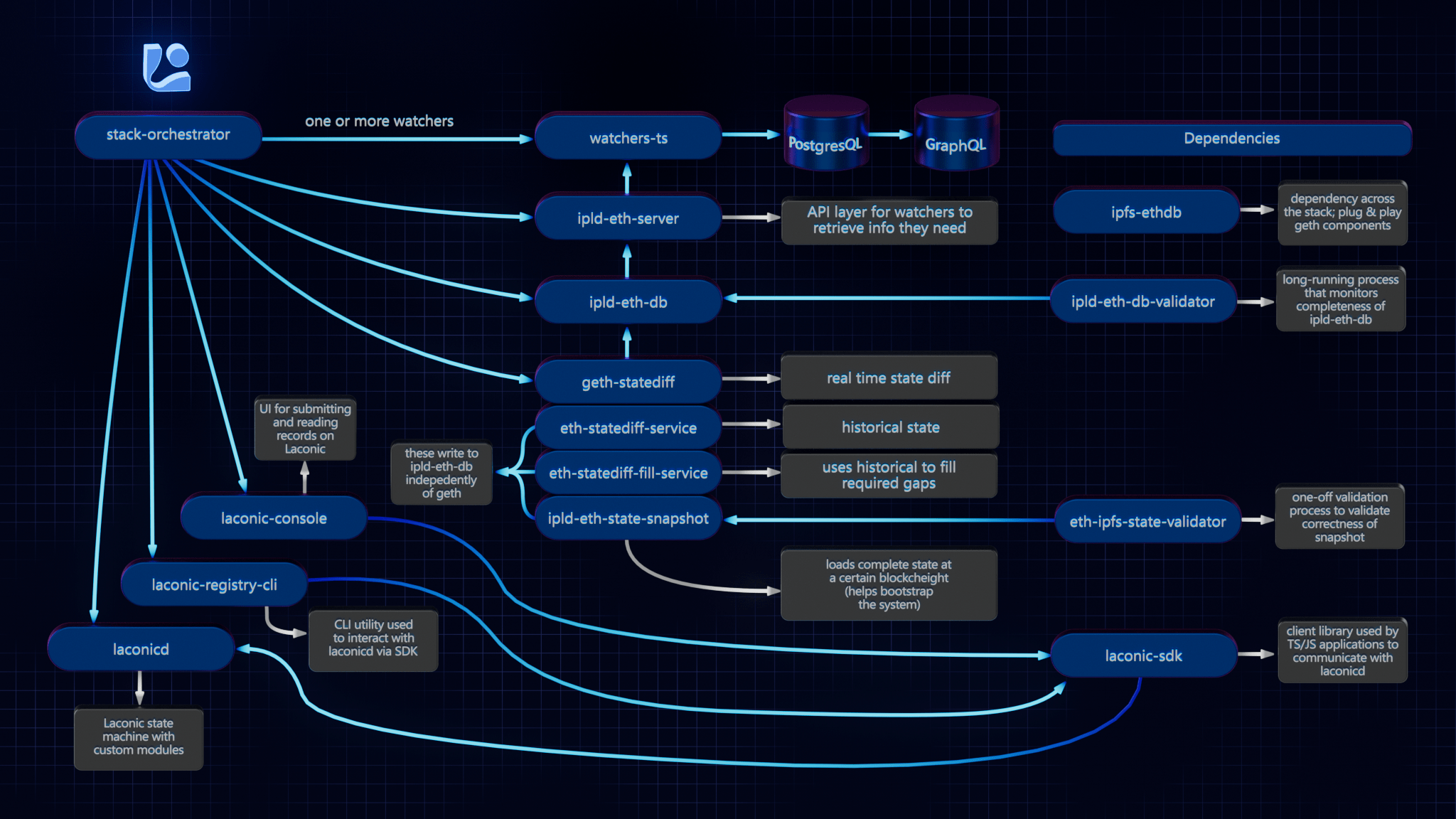
Stack Orchestrator allows building and deployment of a Laconic Stack on a single machine with minimial prerequisites. It is a Python3 CLI tool that runs on any OS with Python3 and Docker. The following diagram summarizes the relevant repositories in the Laconic Stack - and the relationship to Stack Orchestrator.
Install
To get started quickly on a fresh Ubuntu instance (e.g, Digital Ocean); try this script. WARNING: always review scripts prior to running them so that you know what is happening on your machine.
For any other installation, follow along below and adapt these instructions based on the specifics of your system.
Ensure that the following are already installed:
- Python3:
python3 --version>=3.8.10(the Python3 shipped in Ubuntu 20+ is good to go) - Docker:
docker --version>=20.10.21 - jq:
jq --version>=1.5 - git:
git --version>=2.10.3
Note: if installing docker-compose via package manager on Linux (as opposed to Docker Desktop), you must install the plugin, e.g. :
mkdir -p ~/.docker/cli-plugins
curl -SL https://github.com/docker/compose/releases/download/v2.11.2/docker-compose-linux-x86_64 -o ~/.docker/cli-plugins/docker-compose
chmod +x ~/.docker/cli-plugins/docker-compose
Next decide on a directory where you would like to put the stack-orchestrator program. Typically this would be
a "user" binary directory such as ~/bin or perhaps /usr/local/laconic or possibly just the current working directory.
Now, having selected that directory, download the latest release from this page into it (we're using ~/bin below for concreteness but edit to suit if you selected a different directory). Also be sure that the destination directory exists and is writable:
curl -L -o ~/bin/laconic-so https://github.com/cerc-io/stack-orchestrator/releases/latest/download/laconic-so
Give it execute permissions:
chmod +x ~/bin/laconic-so
Ensure laconic-so is on the PATH
Verify operation (your version will probably be different, just check here that you see some version output and not an error):
laconic-so version
Version: 1.1.0-7a607c2-202304260513
Save the distribution url to ~/.laconic-so/config.yml:
mkdir ~/.laconic-so
echo "distribution-url: https://github.com/cerc-io/stack-orchestrator/releases/latest/download/laconic-so" >  ~/.laconic-so/config.yml
Update
If Stack Orchestrator was installed using the process described above, it is able to subsequently self-update to the current latest version by running:
laconic-so update
Usage
The various stacks each contain instructions for running different stacks based on your use case. For example:
Deployment Types
- compose: Docker Compose on local machine
- k8s: External Kubernetes cluster (requires kubeconfig)
- k8s-kind: Local Kubernetes via Kind - one cluster per host, shared by all deployments
External Stacks
Stacks can live in external git repositories. Required structure:
<repo>/
  stack_orchestrator/data/
    stacks/<stack-name>/stack.yml
    compose/docker-compose-<pod-name>.yml
  deployment/spec.yml
Deployment Commands
# Create deployment from spec
laconic-so --stack <path> deploy create --spec-file <spec.yml> --deployment-dir <dir>

# Start (creates cluster on first run)
laconic-so deployment --dir <dir> start

# GitOps restart (git pull + redeploy, preserves data)
laconic-so deployment --dir <dir> restart

# Stop
laconic-so deployment --dir <dir> stop
spec.yml Reference
stack: stack-name-or-path
deploy-to: k8s-kind
network:
  http-proxy:
    - host-name: app.example.com
      routes:
        - path: /
          proxy-to: service-name:port
  acme-email: admin@example.com
config:
  ENV_VAR: value
  SECRET_VAR: $generate:hex:32$   # Auto-generated, stored in K8s Secret
volumes:
  volume-name:
Contributing
See the CONTRIBUTING.md for developer mode install.
Platform Support
Native aarm64 is not currently supported. x64 emulation on ARM64 macos should work (not yet tested).